Integrating Security Into Your DevOps Pipeline
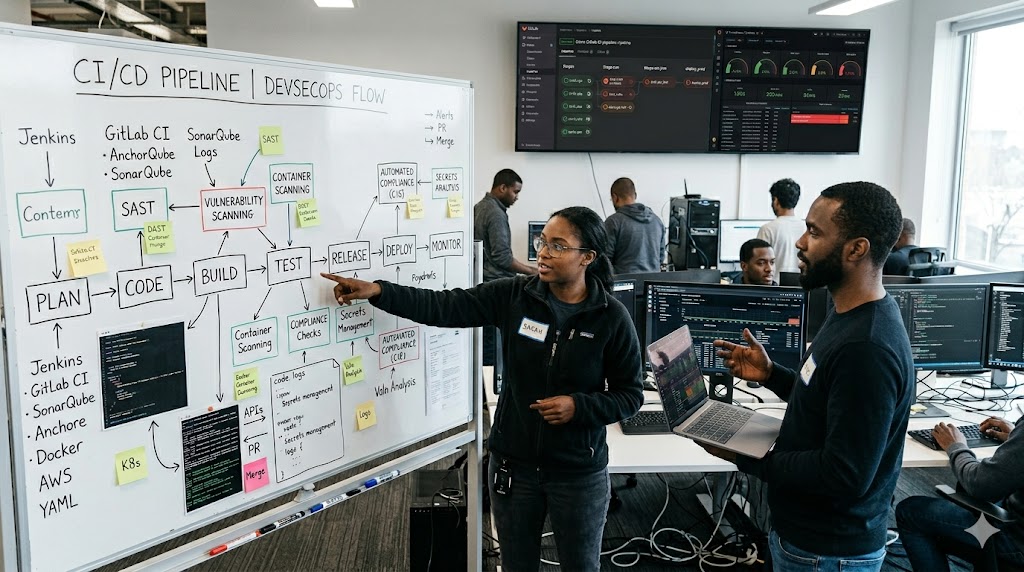
Integrating Security Into Your DevOps Pipeline
Let's be honest. For a long time, security was the awkward relative nobody invited to the DevOps party. Developers wanted to ship fast. Operations wanted things to stay up. And the security team? They showed up after everything was already deployed, pointed at seventeen critical vulnerabilities, and watched everyone cry. Those were dark times.
But things have changed. DevSecOps is the idea that security should not be a bouncer standing at the exit door — it should be baked into every single step of how you build, test, and deploy software. If that sounds like more work, well... it is. But it's a lot less work than explaining to your CEO why customer data just got leaked on a Tuesday afternoon.
Let's walk through how to actually make this happen without losing your mind.
The Shift Left Approach (Or: Stop Waiting Until It's Too Late)
"Shifting left" sounds like something a yoga instructor would say, but in the software world it simply means catching problems earlier in the development process rather than scrambling to fix them at the end.
Think of it this way. Finding a security bug when a developer first writes the code takes maybe 20 minutes to fix. Finding that same bug after it's been deployed to production and a hacker has already found it first? That takes approximately one full existential crisis, three all-nighters, a very uncomfortable board meeting, and somewhere between $50,000 and "we might not survive this."
The shift left philosophy means your developers are thinking about security while they write code, not after they've already shipped it and moved on to the next feature. This requires a cultural shift just as much as a technical one. Your developers shouldn't see security as the enemy. Security shouldn't see developers as reckless cowboys. Everyone is on the same team, just with different superpowers. And yes, it will feel awkward at first. So did agile, and most of you figured that out eventually.
Automated Security Testing (Let the Robots Worry About It)
Here is some wonderful news. You do not have to manually review every single line of code for security issues. Automation exists, and it is glorious. There are three main categories of tools you want living inside your CI/CD pipeline like responsible little security guards.
**Static Application Security Testing, or SAST**, analyzes your source code without actually running it. Tools like SonarQube will read through your codebase and flag issues like SQL injection risks, hardcoded credentials (yes, people still do this, bless their hearts), and insecure function calls. It catches problems before a single line of your code ever executes. Think of it as spell-check, but instead of catching typos it catches things that could bring your entire application to its knees.
**Dynamic Application Security Testing, or DAST**, takes the opposite approach. It actually runs your application and then throws everything it has at it, probing for weaknesses the way a real attacker would. OWASP ZAP is a popular open-source option here. While SAST looks at the code itself, DAST looks at how the application behaves when someone is actively trying to break it. Both approaches catch different things, which is why you want both.
**Software Composition Analysis, or SCA**, is the one people forget about until something goes catastrophically wrong. Modern applications are not written from scratch. They are assembled from dozens or hundreds of open-source libraries and dependencies, each of which was written by strangers on the internet who may or may not have been having a good day. Tools like Snyk continuously monitor these dependencies and alert you when one of them has a known vulnerability. The Log4Shell incident in 2021 is a masterclass in what happens when nobody is watching their dependencies. Millions of systems were exposed because of a flaw in a single logging library. SCA is how you avoid becoming that horror story.
Integrate all three of these into your pipeline so they run automatically on every pull request. That way, nothing sneaks through just because someone forgot to check.
Container Security (Your Containers Are Not As Safe As You Think)
If your team is using Docker and Kubernetes, congratulations, you are very modern and everyone is very impressed. Now here is the part where we talk about how containers can become a security nightmare if you are not careful.
First, scan your container images for vulnerabilities before you ever push them to production. Tools like Trivy or Grype can inspect an image and tell you exactly what vulnerabilities are lurking inside it. And there will be vulnerabilities. Oh, there will be. The question is whether you know about them before or after someone exploits them.
Second, use minimal base images. A lot of developers grab a full Ubuntu base image because it is familiar and comfortable, not unlike grabbing an oversized hotel robe when a perfectly functional smaller one is available. The problem is that every package included in your base image is a potential attack surface. Alpine Linux images are tiny, lean, and contain far less of everything, including the things an attacker could exploit. Smaller image, smaller risk.
Third, implement Pod Security Admission in your Kubernetes clusters to enforce rules about what containers are allowed to do. Containers should not be running as root. They should not have more privileges than they actually need. The principle of least privilege applies here just as much as it does anywhere else in security.
Treat your containers like guests in a very well-run hotel. They get access to their room. They do not get a master key to the entire building.
Infrastructure as Code Security (Your Terraform Files Can Betray You)
Infrastructure as Code is one of the best things to happen to DevOps. The ability to define your entire cloud environment in version-controlled files is genuinely wonderful. It is also genuinely dangerous if those files are full of misconfigurations.
An S3 bucket left publicly accessible. A security group that allows traffic from anywhere. An IAM role with far more permissions than it needs. These are the kinds of mistakes that end careers and make headlines. And they are often sitting quietly in a Terraform or CloudFormation file that nobody thought to review for security issues.
Tools like Checkov, tfsec, or Terrascan scan your infrastructure templates before they are ever applied, catching misconfigurations while they are still just text in a file rather than live resources sitting exposed on the internet. Plug these into your pipeline alongside your application security tools and you get a complete picture of your security posture rather than just half of it.
Think of it as proofreading your infrastructure the same way you proofread your code. Except the typos here can result in a data breach instead of a slightly embarrassing Slack message.
Secrets Management (For The Love Of Everything, Stop Putting Secrets In Your Code)
We need to have a talk. A serious one. About the API keys, database passwords, and private tokens that developers sometimes hardcode directly into source files and then commit to version control. This happens more than it should. Much more.
Secrets do not belong in your codebase. They do not belong in your environment variable files that get committed. They do not belong in your Docker images. They belong in a dedicated secrets management solution like HashiCorp Vault, AWS Secrets Manager, or Azure Key Vault, where they can be encrypted, rotated, and audited properly.
Add a secrets scanning tool like GitLeaks or truffleHog to your pipeline to catch any credentials that accidentally slip through. These tools scan your commit history and flag anything that looks like a secret before it ever makes it to your main branch. It is a simple addition that has saved many engineers from a very unpleasant conversation with their security team.
Monitoring and Incident Response (Because Something Will Eventually Go Wrong)
Here is a truth that nobody in security likes to say out loud but everyone knows: no security setup is perfect. Determined attackers are creative. Zero-days happen. Humans make mistakes. The goal is not to make breaches impossible. The goal is to detect them fast and respond faster.
A Security Information and Event Management system, commonly called a SIEM, aggregates logs from across your entire infrastructure and helps you identify suspicious patterns. Tools like Splunk, Elastic SIEM, or the more affordable Wazuh give you a centralized view of what is happening across your systems so that a breach does not go unnoticed for six months while data quietly walks out the door.
Pair your SIEM with a clear incident response plan. Not a vague one. A specific, documented, regularly tested plan that answers the following questions before an incident happens: Who gets notified? In what order? Who has the authority to take systems offline if necessary? Where do the logs get preserved for forensics? Who talks to the press if it comes to that?
Running a tabletop exercise where your team walks through a simulated breach scenario is one of the most valuable things you can do, and it costs nothing except a couple of hours and perhaps some mild secondhand embarrassment when you realize how many gaps exist in your plan. Better to find those gaps in a simulation than during an actual incident at 2am.
Conclusion
DevSecOps is not a product you buy or a checkbox you tick. It is a philosophy, a culture, and a continuous practice. It is the understanding that security is everyone's responsibility, that automation is your friend, and that the cost of fixing problems early is always, always lower than the cost of fixing them after they've been exploited.
The teams that get this right are not necessarily the ones with the biggest security budgets. They are the ones where developers feel empowered to raise security concerns, where pipelines automatically catch what humans miss, and where the response to "we found a vulnerability" is a calm, practiced process rather than a full-scale panic.
Start somewhere. Pick one thing from this article, add it to your pipeline this week, and build from there. Security is a journey, and the best time to start was yesterday. The second best time is right now, before you ship that next feature that definitely does not have any hardcoded API keys in it. (Check again. Just to be safe.)